
Catalog Photography
The "Nike Aesthetic": Catalog Consistency
A full playbook for keeping lighting, angles, and crops uniform across 100+ SKUs so your store feels intentional and premium.
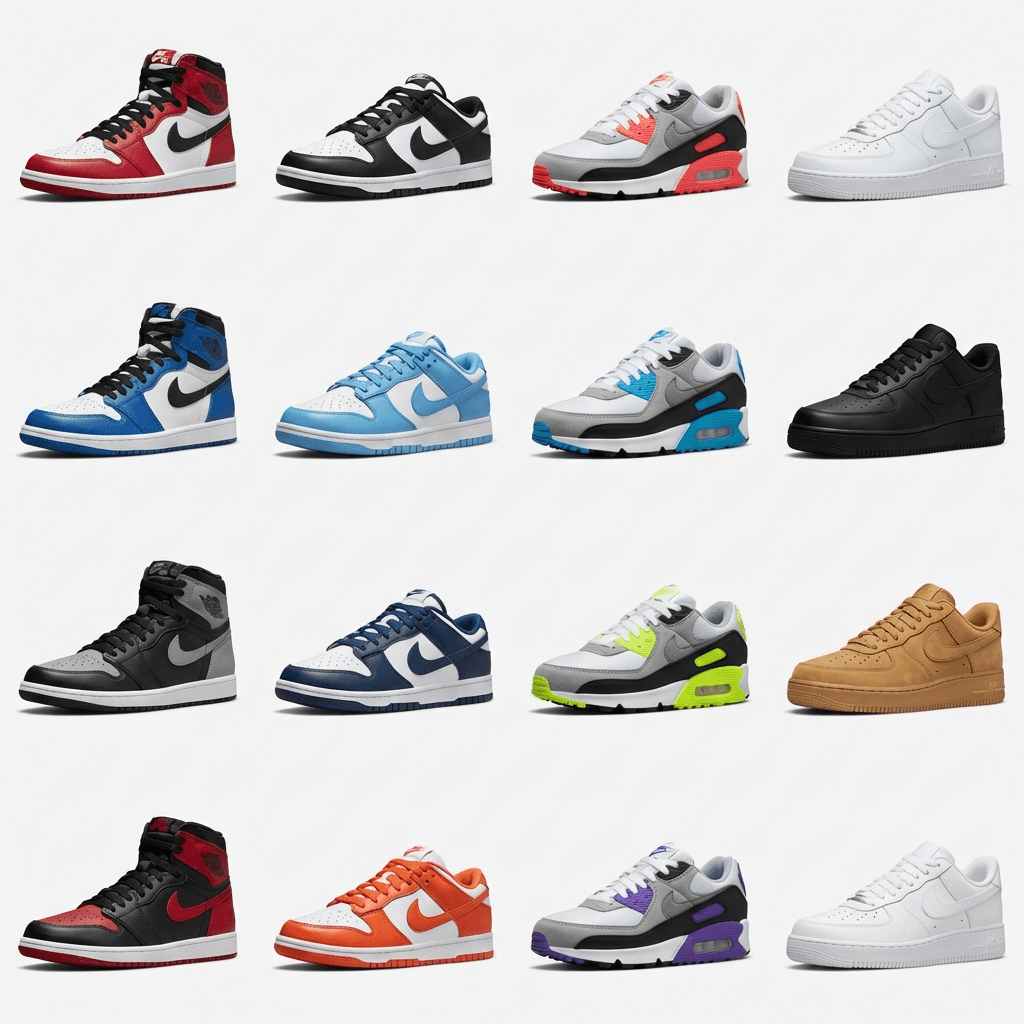

Achieve uniform lighting and angles across 100+ SKUs.
Catalog consistency is the fastest way to make a small brand feel established. This guide shows the exact system behind the "Nike aesthetic" and how to reproduce it with a practical workflow.
Why catalog consistency wins attention and trust
Catalog consistency is not a design preference. It is a trust signal. When every product appears to be shot in the same lighting, from the same height, with the same crop, shoppers assume you control the brand end to end. When images look inconsistent, they assume suppliers, resellers, or stock imagery. That split second interpretation is why catalog consistency is one of the highest leverage improvements you can make.
Baymard research shows that product images are the first interaction for many shoppers, and image quality can make or break a purchase path. In their UX benchmark, only 49 percent of sites deliver a decent or good product page experience, while 51 percent are still mediocre or worse. If your catalog already looks consistent, you start ahead of half the market. Baymard: Product Page UX.
Baymard also notes that 56 percent of users start by inspecting product images, and 25 percent of sites still fail to provide sufficient image resolution for zoom or detailed inspection. When the image experience is weak, shoppers cannot confirm texture, material, or size. That weak visual foundation makes every other conversion element harder to trust. Baymard image resolution research.
Consistency is not just about clean visuals. It reduces cognitive load. When shoppers know what to expect from the next image, they can scan faster and compare products more confidently. That sense of control is the difference between a premium brand and a random assortment of product listings.
Consistency creates three outcomes:
- Higher click through rates because your category grid feels intentional.
- Lower return rates because visual expectations match reality.
- Faster purchasing because the imagery removes doubt.
What the "Nike aesthetic" actually means
The phrase "Nike aesthetic" is shorthand for a catalog that feels cohesive, premium, and controlled. This is not about copying a specific brand. It is about repeating a visual system so well that every SKU looks like it belongs in the same family. Nike does this at scale, but any brand can do the same thing with the right process.
In practice, that aesthetic comes from a small number of decisions that never change. The light always comes from the same direction. The hero angle is always the same. The crop is consistent. The background never competes with the product. When those rules are fixed, the catalog feels like one cohesive collection, even if the products are diverse.
If you want to translate the "Nike aesthetic" into a system you can apply, focus on these four principles:
- Uniform light direction. Shadows fall the same way on every item, so products feel like they were shot in one controlled studio.
- Repeatable hero angle. The first image is always the same camera height and tilt, which makes the grid feel disciplined.
- Consistent crop and spacing. Each product fills the frame at the same visual weight so the grid reads clean and balanced.
- Stable color and exposure. White balance and contrast stay fixed so your catalog does not look stitched together.
When those four elements stay steady, you can introduce variety in the rest of the image stack without breaking the system. This is how larger brands keep their catalog consistent while still showing detail shots, lifestyle context, and packaging.
The consistency stack you must lock
Consistency is a stack of decisions. If you lock the top layers but change the base, you still get drift. The goal is to define each layer once and follow it for every SKU. Here is the consistency stack that creates the "Nike aesthetic" in a scalable way.
1. Background and surface
Pick one background for your hero images and stick with it. If you use pure white, keep it pure. If you use a light gray or a soft gradient, use the same value on every product. The background is the easiest inconsistency to notice, so do not allow variation here.
2. Lighting direction and softness
Lighting creates the mood of the catalog. Choose a single light direction and decide how soft the shadows should be. If the light is too hard for some products and soft for others, the grid feels chaotic. This is why a fixed lighting recipe is essential.
3. Camera height and lens choice
Camera height is the silent consistency killer. If one product is shot from waist height and another from chest height, the perspective shifts. Lock your lens and height, then measure the distance from the product so you can repeat it later.
4. Hero angle and crop ratio
Decide what your hero angle is and keep it. For shoes, it might be a 15 degree angle. For bottles, it might be a straight on shot. Whatever it is, lock it and make that the first image for every SKU. Then define how much of the frame the product should fill. This alone makes the grid feel intentional.
5. Image order and shot list
The order of images is part of the aesthetic. If one product starts with a front view and another starts with a top view, shoppers cannot compare quickly. Use a consistent image stack such as hero, secondary angle, detail, scale, and lifestyle. If you want a full breakdown of image ordering, the 7 image stack guide is a good baseline to adapt.
6. Editing and export settings
Editing is where consistency can fall apart, especially if multiple people are involved. Use one preset for contrast, color, and sharpening. Export every image in the same size, color profile, and compression settings. A single inconsistent preset can ruin the entire catalog.
Shortcut to consistency
If you can only lock three things, lock lighting direction, camera height, and crop ratio. Those three controls remove most of the visible drift in a grid view.
Build a one page catalog style guide
A one page style guide is the single best tool for keeping a catalog consistent across time and across people. It prevents "creative interpretation" and makes your catalog look like it was produced by one disciplined team. The goal is not to write a long document. The goal is to make the rules visible and usable in every shoot.
Use a single page and include the exact inputs that control how the product looks. If a photographer or retoucher can follow the guide without asking questions, you did it right.
One page style guide template
| Element | Standard |
|---|---|
| Background | Pure white (#FFFFFF) or light neutral gray |
| Light direction | Key light at 10 o'clock, fill at 2 o'clock |
| Camera height | Lens center aligned to product midline |
| Hero angle | 15 degree tilt, centered, consistent crop |
| Crop ratio | Product fills 80 percent of frame, 1:1 output |
| White balance | 5500K daylight, locked in camera |
| Editing preset | Single preset for contrast and sharpness |
| Export size | 2000 x 2000 px, sRGB, 85 percent JPG |
The exact values are less important than consistency. If you prefer a darker background or a softer highlight, that is fine. The critical part is that the choice is documented and never changes unless you intentionally update the whole catalog.
Style guide tip
Use three reference images from your best sellers and put them at the top of the guide. That gives everyone a visual anchor for what "consistent" actually looks like.
Production workflow for 100+ SKUs
Consistency at scale is a workflow problem, not a talent problem. When you have 100+ SKUs, the biggest risks are drift over time, inconsistency between batches, and shortcuts that introduce new lighting or crop rules. This workflow keeps the system intact as the catalog grows.
Step 1: Build a reference kit
The reference kit is the physical checklist that keeps your setup stable. It includes your camera height mark, lens choice, lighting positions, and a sample product used for framing. This kit prevents the "small shifts" that destroy consistency over time.
Step 2: Shoot a pilot batch
Pick 5 to 10 SKUs that represent different sizes and materials. Shoot them in one session. Use these images to refine the style guide and make sure your lighting and crop rules work across different shapes. It is faster to adjust after a pilot than after 100 products.
Step 3: Batch production in consistent sets
Divide the catalog into batches of around 20 SKUs. This keeps the setup stable and reduces the chance of drift. After each batch, review the images against the pilot set and correct any deviation. This is the point where most catalogs lose consistency, so build review time into the schedule.
Step 4: Standardize post production
Use a single preset and apply it across every batch. If multiple people edit the images, share the preset and require a simple before and after check against the pilot set. Editing is the easiest way to introduce inconsistency, so guard it.
Step 5: Run a QC pass before publishing
QC is not optional. It is the gate that keeps your catalog consistent. Compare the batch against the style guide and fix any background shifts, angle changes, or exposure issues. If a product is off, correct it before it goes live.
Video walkthrough
This video breaks down how top converting stores keep visual structure across their catalog.
This manual workflow works, but it requires discipline. As the catalog grows, the system must stay intact or your images will slowly drift. If you cannot keep the workflow consistent, that is a sign you should consider an automated approach.
Interactive: Catalog Consistency Planner
Use the planner to estimate how lighting and editing decisions affect your catalog at scale. Small variations add real hours when you multiply them by 100 or more SKUs. Use the outputs to decide whether your current workflow can hold consistency.
Interactive Planner
Catalog Consistency Planner
Estimate how your lighting, background, and editing choices impact consistency at scale. Adjust the inputs to see where drift starts to cost real time.
Higher scores mean less visual drift and fewer reshoot hours across a 100+ SKU catalog.
84.0
Includes 0% rework from inconsistency.
0.0
Time lost to mismatched lighting and crops.
6
Plan for batches of about 20 SKUs.
Consistency controls
Common mistakes that break consistency
Consistency fails in predictable ways. If your catalog feels uneven, these are the first issues to audit.
- Multiple lighting setups. Switching light direction between batches creates shadow shifts that are obvious in grid view.
- Changing lens or camera height. Even a small height change alters perspective and makes products feel mismatched.
- Mixing background tones. Off white and true white look different side by side.
- Inconsistent cropping. Some products fill the frame and others sit too small.
- Batch retouching without a reference. If each batch is edited in isolation, the catalog drifts.
If you spot any of these, fix them before adding new SKUs. Consistency is easiest to maintain when the catalog is still small.
Product page UX standards to mirror
Catalog consistency does not live in a vacuum. It supports the broader product page experience. Baymard research shows that the majority of ecommerce sites still fail to deliver strong product page UX, which means the bar is lower than you think but the winners are disciplined. The product page UX benchmark is a good standard to align with. Baymard product page UX benchmark.
Baymard also notes that 91 percent of sites do not provide an in scale product image, even though users rely on visual cues to understand size. This is a huge opportunity for differentiation. If your image stack includes a consistent in scale shot, you reduce returns and increase confidence. Baymard in scale image research.
The practical takeaway is simple. Consistency should not stop at the hero image. It should extend to the supporting images that answer size, texture, and material questions. When each SKU provides the same set of answers in the same order, your catalog feels reliable.
UX aligned image checklist
- Hero image in a consistent angle and crop.
- Second angle to confirm shape and depth.
- Detail close up to prove material quality.
- In scale reference shot for size clarity.
- Optional lifestyle shot, same lighting mood.
Consistency across channels and marketplaces
Catalog consistency is not only for your storefront. Your images show up in ads, emails, marketplaces, and comparison tools. If those channels show mismatched visuals, your brand feels fragmented even if your website is clean. The goal is to build a single image system that survives export into every channel.
Start with the hero image. This is the image that shows up in ads, category grids, and recommendation modules. If your hero image changes depending on where the product appears, shoppers experience the same product as multiple identities. That disconnect creates doubt. A single hero template fixes that. The template should include the same crop ratio, background, and lighting profile across every SKU.
Next, standardize file sizes and aspect ratios for your secondary images. For most catalogs, a square output works best because it adapts to marketplace grids, social feeds, and on site layouts. If you need alternate ratios, define them as derivatives of the same master file rather than separate edits. That keeps lighting and color stable even when crops change.
If you sell on marketplaces, consistency has to account for their image rules. You should have a compliant version of the hero image and a marketing version that can support overlays or lifestyle context. The trick is to keep both versions within the same lighting system so they still feel like one brand. Build these variations as structured outputs, not ad hoc edits.
Channel consistency checklist
- One hero image template that is used in every channel.
- Square master file for clean reuse across layouts.
- Separate compliant and marketing variants that share the same lighting rules.
- File naming rules that keep the latest images in sync.
- A single source folder that every team uses, not local edits.
The more channels you operate, the more valuable consistency becomes. A clean system prevents the marketing team from creating one look, the marketplace team from creating another, and the web team from creating a third. When one source of truth powers every surface, your catalog feels cohesive everywhere.
Advanced polish without losing the system
Once the core system is locked, you can add polish that makes the catalog feel premium without breaking consistency. The key is to introduce variation in controlled ways.
Add dimensional assets carefully
3D views or subtle rotations can increase confidence, but only if the lighting and shadow style match the hero image. If the 3D view looks like a different studio, it will hurt trust. Keep the same lighting direction and background tone across all assets.
Standardize lifestyle context
If you use lifestyle shots, use the same environment and color palette for each SKU. Lifestyle does not mean random. It means a controlled environment that still matches the hero image system.
Create brand elements that repeat
Elements like a consistent drop shadow, a specific crop margin, or a branded texture can make the catalog feel more premium. The rule is to apply that element everywhere, not just on a few products.
Consistency test
Zoom out on your category grid and blur your eyes. If the grid still looks organized, your system holds. If it looks noisy, you added variation too early.
How Rendery3D makes catalog consistency easy
Manual consistency is possible, but it does not scale well. Rendery3D gives you the same consistent output without rebuilding the studio for every new SKU. Upload your product once and generate a repeatable image stack that follows your catalog rules.
- Unified lighting and angles. Keep the hero view identical across every product.
- Controlled backgrounds. Standardize clean backgrounds without manual retouching.
- Fast iteration. Generate new angles and variations without reshoots.
- Brand protection. Preserve labels and packaging so the catalog stays authentic.
If you want to standardize your catalog quickly, start with the AI product photography workflow. For marketplace specific needs, the Amazon product photography service keeps the catalog compliant while staying consistent. You can also build matching scenes with the AI background generator.
To get started, review the pricing options or jump straight into a free trial at Rendery3D signup.
Summary checklist
Catalog consistency is a system you build once and reuse forever. Use this checklist to keep the "Nike aesthetic" intact as you scale beyond 100 SKUs.
- Lock lighting direction, camera height, and crop ratio.
- Create a one page style guide and share it with anyone touching images.
- Shoot a pilot batch and use it as the reference for every future batch.
- Standardize the image order so shoppers can compare quickly.
- Run a QC pass after every batch before publishing.
- Update the system only when you are ready to refresh the full catalog.
Final thought
The "Nike aesthetic" is not about copying a brand. It is about consistency so strong that shoppers trust your catalog without thinking twice.