
Amazon Listing Optimization
Amazon Main Image Rules 2026: Why Listings Are Getting Suppressed (And How to Fix It Instantly)
Your listing is invisible if you miss these 3 hidden rules. Learn exactly what Amazon's algorithm checks - and how to pass every time.
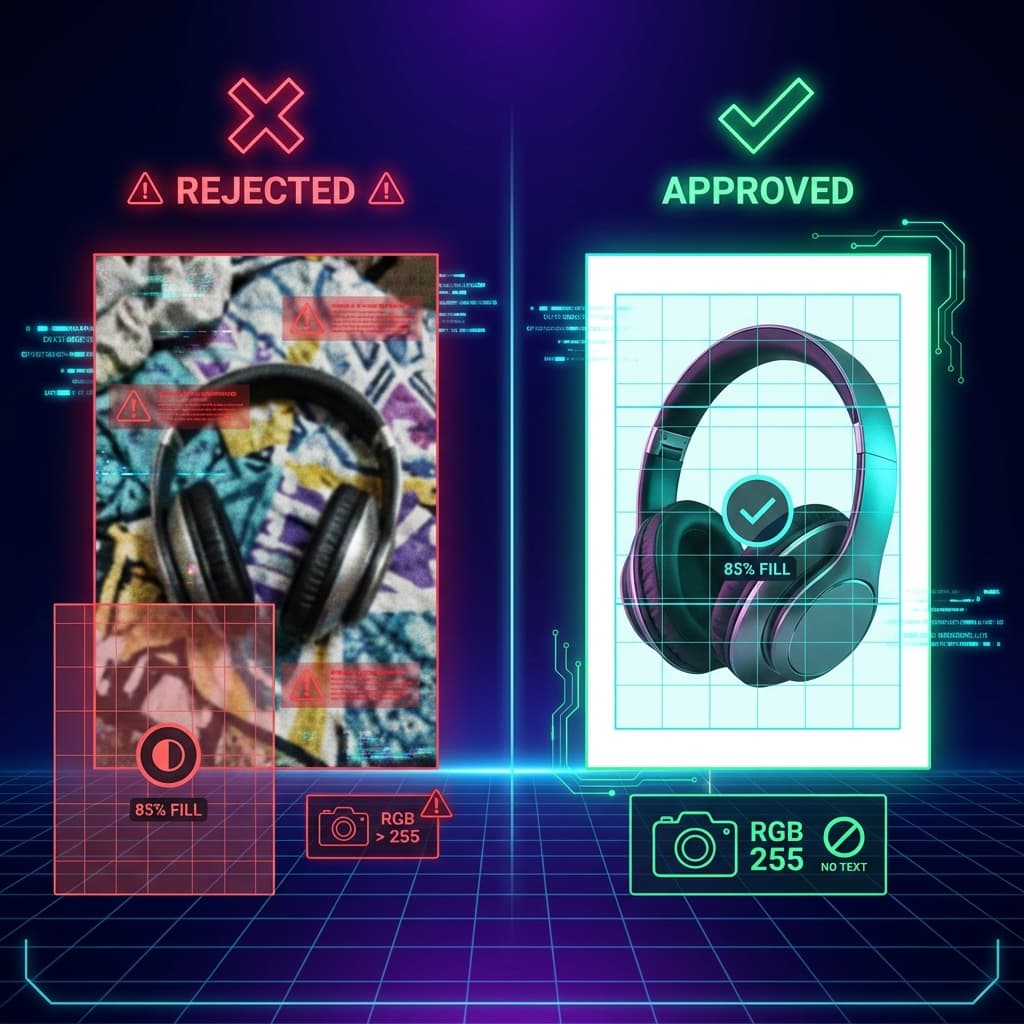

You've done everything right. Great product. Optimized title. Competitive price. And yet - your listing isn't showing up in search results.
You check Seller Central and see the dreaded message: "Your listing has been suppressed due to image quality issues."
Here's the frustrating part: your images look fine. Professional, even. So what went wrong?
🚨The Brutal Reality
Amazon's automated systems scan every main image for compliance. They don't care how expensive your photoshoot was. They don't care that your image "looks white enough." If your background isn't exactly RGB 255,255,255 - you're suppressed. If your product doesn't fill exactly 85% of the frame - you're suppressed.
In this guide, I'll show you the 3 hidden rules that cause 90% of Amazon main image suppressions. These aren't the obvious requirements everyone knows - they're the technical specifications that catch even experienced sellers off guard.
Many
of new listings face suppression within first 48 hours
RGB 255
exact white value required - 248 triggers suppression
$0
revenue while suppressed. Every day counts.
💡What You'll Learn
- The 3 hidden technical requirements Amazon's algorithm actually checks
- Why "white enough" backgrounds still get suppressed (the RGB 255 rule)
- The exact frame fill percentage required - and how to measure it
- Step-by-step manual fix for each compliance issue
- How to generate compliant images automatically every time
📺 Watch: Amazon Image Requirements Explained
This video covers the official Amazon image requirements. Below, we dive deeper into the hidden technical specifications that cause the most suppressions.
1. Why Your Listing Disappeared (The Hidden Cause)
Amazon processes millions of product images daily using automated computer vision systems. These systems don't evaluate images the way humans do - they run precise technical checks.
According to Amazon's official image requirements, your main image must meet specific criteria. But here's what most sellers miss: Amazon's documentation uses soft language like "should" and "recommended" - while their algorithm enforces these as hard requirements.
The Suppression Process
Image Upload
You upload your product image to Seller Central
Automated Scan
Amazon's CV system analyzes background color, product boundaries, text detection
Compliance Check
System compares against hard-coded thresholds (RGB values, fill %, etc.)
Fail? → Immediate Suppression
No warning. No grace period. Your listing vanishes from search.
The worst part? You might not even realize you're suppressed for days. You'll just notice sales dropping to zero - wondering if it's a market issue, when really your listing is completely invisible.
2. The 3 Hidden Rules That Cause 90% of Suppressions
I've analyzed hundreds of suppressed listings and worked with thousands of Amazon sellers. The pattern is clear: three specific technical requirements cause the vast majority of image-based suppressions.
These aren't obscure edge cases. They're fundamental requirements that Amazon enforces algorithmically - but doesn't clearly communicate in their documentation.
RULE #1
Pure White = RGB 255,255,255 Exactly
Off-white, cream, light gray - all trigger suppression. Amazon checks pixel values at the corners and edges of your image. If any return values below 250, you're flagged.
RULE #2
Product Must Fill 85%+ of Frame
Amazon calculates the bounding box of your product and compares it to total image dimensions. Products filling less than 85% get lower search visibility or outright suppression.
RULE #3
Zero Text, Logos, or Graphics
Amazon's OCR scans for any text overlay. "Best Seller," "Sale," logos, badges - all prohibited on main images. Only text physically printed on the product is allowed.
Let's dive deep into each of these rules - including exactly how Amazon's algorithms detect violations.
Amazon Main Image Compliance Checker
Upload your main product image to check if it meets Amazon's hidden requirements. Our analyzer checks the 3 rules that cause 90% of listing suppressions.
RGB 255,255,255 White
Amazon requires PURE white (RGB 255,255,255). Off-white (248-254) triggers automatic suppression.
85% Frame Fill
Your product must fill at least 85% of the image frame. Less coverage = lower search visibility.
Zero Text/Graphics
No badges, text, logos (unless part of product), or promotional graphics on main image.
Upload an image to see compliance analysis
Need to fix your images instantly?
Rendery3D automatically generates Amazon-compliant images with pure white backgrounds, proper sizing, and zero text - every time.
3. Rule 1: Pure White (RGB 255,255,255) - No Exceptions
This is the rule that catches the most sellers by surprise. Your background might look white to your eyes - but Amazon's algorithm sees something different.
Why "White Enough" Isn't Good Enough
Digital images represent white as RGB (255, 255, 255). When you photograph a product against a white backdrop, the resulting image rarely captures pure white because:
- Lighting creates shadows and gradients
- Camera sensors have slight color casts
- JPEG compression introduces noise
- Post-processing can alter white balance
A background that looks white might actually be RGB (248, 248, 250) - which Amazon's algorithm rejects.
❌ Will Be Suppressed
- • Off-white backgrounds (RGB 248-254)
- • Cream or ivory tints
- • Light gray gradients
- • Natural lighting shadows
- • Colored studio backdrops
✓ Will Pass
- • Pure white (RGB 255,255,255)
- • Digitally removed backgrounds
- • AI-generated white backgrounds
- • Professionally color-corrected images
- • Clipping path + white fill
💡Pro Tip: How to Check Your Background
Open your image in Photoshop, sample the background with the eyedropper tool, and check the RGB values. If any value is below 255, you need to adjust. In Photoshop: Select → Color Range → Highlights → adjust Levels until corners show 255,255,255.
4. Rule 2: The 85% Fill Requirement
Amazon wants your product to be the star of the show. The 85% frame fill requirement ensures products appear prominently in search results and on product detail pages.
How Amazon Calculates Fill Percentage
Amazon's algorithm calculates the bounding box of your product (the smallest rectangle that contains all non-white pixels). It then divides the product area by total image area:
If the result is below 85%, your image fails compliance.
Common Mistake: Too Much White Space
Photographers often leave generous margins for "breathing room." This looks professional for print - but fails Amazon compliance. The product must dominate the frame.
Exception: Long/Tall Products
For products with extreme aspect ratios (tall bottles, long tools), diagonal positioning or slight tilts can maximize fill percentage within a square frame.
For more on optimizing your Amazon listing images, see our Amazon CRO playbook.
5. Rule 3: Zero Text Policy (Stricter Than You Think)
Amazon's OCR (Optical Character Recognition) system scans every main image for text overlays. This rule is more strictly enforced than ever in 2026.
🚫Prohibited on Main Images
- "Best Seller" or "#1" badges
- Sale prices or discount percentages
- Promotional text ("Free Shipping," "Limited Time")
- Company logos (unless printed on product)
- Dimension callouts or feature labels
- Watermarks for copyright protection
- Website URLs or social media handles
- Borders, frames, or decorative elements
✓What IS Allowed
- Text physically printed/embossed on the product
- Brand names that are part of the product design
- Care labels visible on clothing
- Text on book covers (books category)
Important: Secondary images (slots 2-9) have more flexibility. You CAN use infographics, feature callouts, and lifestyle text on additional images. See our FBA listing strategy guide for best practices.
6. How to Fix Non-Compliant Images (Manual Method)
If your listing is suppressed, here's the step-by-step process to manually fix each compliance issue:
Step 1: Fix Background Color
- Open image in Photoshop or GIMP
- Use Magic Wand or Select Subject to isolate product
- Invert selection to select background
- Fill with pure white (#FFFFFF / RGB 255,255,255)
- Check corners with eyedropper - must show 255,255,255
- Export as JPEG (100% quality) or PNG
Step 2: Increase Fill Percentage
- Use Image → Canvas Size to reduce margins
- Or use Image → Image Size to scale product up
- Aim for product edges to nearly touch frame edges
- Leave minimal padding (5-10% max on each side)
- Maintain 1:1 aspect ratio (square format)
Step 3: Remove Text/Graphics
- Identify all text overlays, logos, badges
- Use Content-Aware Fill or Clone Stamp to remove
- Replace removed areas with pure white
- Save text-heavy content for secondary images
⏱️Time Required (Per Image)
Manual editing takes 15-45 minutes per image depending on complexity. For a 7-image listing, that's 2-5+ hours of work - plus the learning curve if you're not proficient in Photoshop.
That's a lot of work. And every time you launch a new product, you face the same grind. There has to be a faster way...
7. How Rendery3D Fixes This Automatically
Here's the thing: manually fixing Amazon compliance issues is tedious, time-consuming, and error-prone. That's exactly why we built Rendery3D.
Guaranteed Pure White Backgrounds
Every image generated with RGB 255,255,255 backgrounds. No manual adjustment needed. Zero suppression risk from background issues.
Automatic 85%+ Fill Optimization
AI automatically frames your product to fill the optimal percentage of the image. Works for any product shape or aspect ratio.
Clean Images, No Text Overlays
Main images are generated clean. Text and infographics are reserved for secondary image slots where they're allowed.
2000x2000px+ Resolution
All images generated at Amazon's recommended resolution for zoom functionality. No upscaling artifacts.
Full Listing Sets in Minutes
Generate main image + 8 secondary images from smartphone photos. No shipping samples to photographers. No waiting weeks for delivery.
The Bottom Line
Manual compliance fixing: 2-5+ hours per listing, error-prone, requires Photoshop skills
Rendery3D: 10 minutes, guaranteed compliant, no design skills needed
For $45/month, you can generate complete image sets for up to 6 products - each with 9 Amazon-compliant images. That's less than the cost of a single suppression's lost sales.
Learn more about the AI photography workflow in our complete guide to skipping sample shipping.
8. Key Takeaways & Compliance Checklist
Pure white means RGB 255,255,255 - off-white (even 248) triggers automatic suppression. Check with eyedropper tool.
Product must fill 85%+ of the frame - minimal margins, product dominates the image.
Zero text, logos, or promotional graphics - only text physically on the product is allowed.
Minimum 1000px for zoom, 2000px+ recommended - larger images perform better in search.
Suppression = invisible listing - every day suppressed is revenue lost. Fix issues immediately.
📋 Pre-Upload Compliance Checklist
Don't let image compliance issues cost you sales. Either master manual editing - or let AI handle it automatically. Your choice. But one way or another, get compliant before you upload.
For more Amazon optimization strategies, check out our complete Amazon CRO playbook and A+ Content strategy guide.